| Provider Type(s) for Which These Instructions Apply | Program(s) for Which These Instructions Apply |
|---|---|
| Home Care | ADvantage Medically Fragile |
Per policy, a maximum of eight (8) units per day of nursing may be billed for assessment/evaluation and/or service plan development. These units include assessment and IDT visits and are not considered Skilled Nursing Visits. Assessment and IDT visits must be claimed and billed for under T1002.
Note: Eight (8) units represents the maximum allowable amount and is not the standard expectation. It should be used rarely and is not anticipated for the majority of cases. On average, most nurse visits should utilize five (5) units. If additional units are needed, the Home Care Provider may submit the request following the process below to request additional T1002 Units be added for the specific visit.
Nursing services are prior authorized by the Medicaid Services Unit (MSU) and billed per fifteen (15) minute unit of service. Units are billed according to the amount of time it takes to complete the activity and not for a set number of units to complete specific documents or tasks. Nursing tasks should be completed in a way that best utilizes authorized units and prevents fraud, waste or abuse of service authorizations. Per policy 317:35-17-22, providers do not bill for services performed for less than eight (8) minutes. Less than eight (8) minutes of service work cannot be rounded up and does not constitute a billable fifteen (15) minute unit; and eight (8) to fifteen (15) minutes are rounded up and do constitute a billable fifteen (15) minute unit. Evidence of paid claims not supported by documentation of service provision are referred to the Oklahoma Health Care Authority (OHCA) Program Integrity Unit for follow-up investigation.
Request for Additional HC (T1002) Units
- Using Provider Plus or Provider Prime role in Harmony
- Open the Member Record.
- Select the Documents Tab

- Hover over “File” on the Menu bar
Select “Add Document”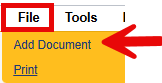
- Select “ADv/MFW – Request for additional HC (T1002) Units

- Fill out the document
Update the Document Status = “Complete” once all documentation is added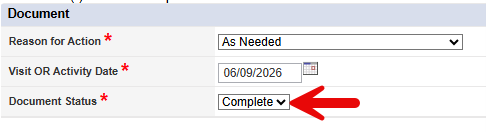
- Hover over “File” on the Menu bar
Select “Save and Close Document”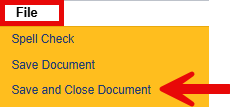
- Select the Plans Tab

- Open the plan that contains the Authorization that needs additional units added
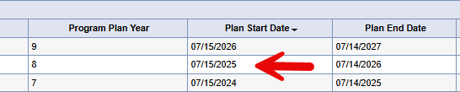
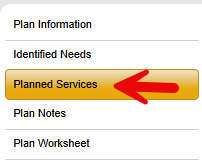
- Open the Planned Services Sub-Tab
- Select the T1002 line that needs additional units added
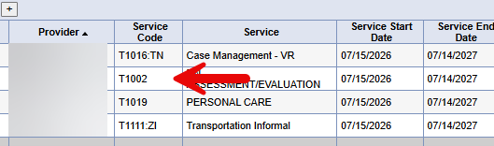
Note: T1002 is the only Home Care Line that can be processed following this process. - Update the SPA Review Status = Additional HC (T1002) Units Request (Provider Use Only)

- In the New Text box type in a comment to indicate the number of additional units being requested and the date of the visit that needs additional units
Select “Append Text to Note”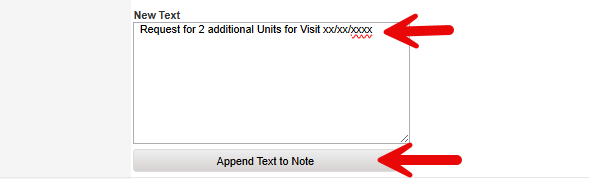
- Hover over “File” on the Menu bar
Select “Save and Close Planned Services”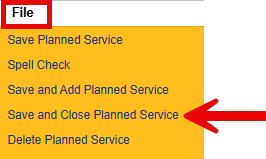
- Hover over “File” on the Menu bar
Select “Close Planned Services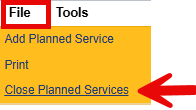
Misc. Information:
- The Medicaid Services Unit (MSU) will be notified on a report that the planned service was updated to “Additional HC (T1002) Units Request (Provider Use Only)”.
- This is the only scenario in which a Home Care Provider will be making updates to planned services on an ADvantage or MFW Case.
- The Plan Status should not be updated, only the Planned Service as shown above.
- A new T1002 line should not be added when one for your agency is already existing.
- Please give at least 30 days for the request to be processed.
- The Provider should monitor the “Authorizations New/Changed” report to see when the authorization is updated with the additional units.
- Any visit billed for more than 5 units requires a completed request form. Although up to 10 units or more may be authorized for the service plan year, providers may not allocate units across visits in a way that exceeds 5 units per visit without approval. For example, billing 3 units for one visit and 7 units for another visit is not appropriate unless a request for additional units has been submitted and approved.