| Provider Type(s) for Which These Instructions Apply | Program(s) for Which These Instructions Apply |
|---|---|
| Case Management | ADvantage |
Case Management (CM) services assist a Member in gaining access to medical, social, educational, or other services, regardless of payment source of services, that may benefit the Member in maintaining health and safety. Case Managers initiate and oversee necessary reassessments to re-establish waiver program eligibility. A billable case management activity is any task or function defined under OAC 314:30-5-763(1)(A) that only an ADvantage case manager because of skill, training or authority can perform on behalf of a Member. Ancillary activities such as clerical tasks like mailing letters, making copies, filing, faxing, drive time or supervisory/administrative activities are not billable case management activities. The administrative cost of these activities and other normal and customary business overhead costs have been included in the reimbursement of rate for billable activities.
The Request for Additional Case Management Units form is required to be completed and submitted in order to request additional CM units. References to other areas of the system or other forms will not be accepted.
Request for Additional CM Units
- Using Provider Plus or Provider Prime role in Harmony
- Open the Member Record
- Select the Documents Tab

- Hover over “File” on the Menu bar
Select “Add Document”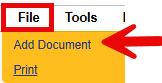
- Select “ADv – Request for additional CM Units

- Fill out the document
Update the Document Status = “Complete” once all documentation is added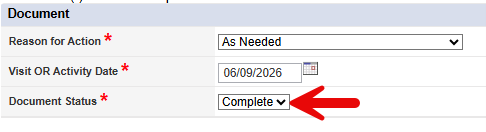
- Hover over “File” on the Menu bar
Select “Save and Close Document”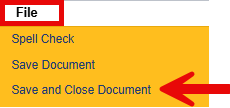
- Select the Plans Tab

- Open the plan that contains the Authorization that needs additional units added
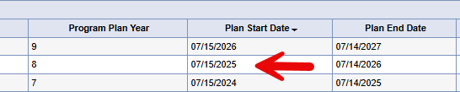
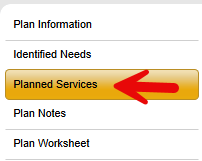
- Open the Planned Services Sub-Tab
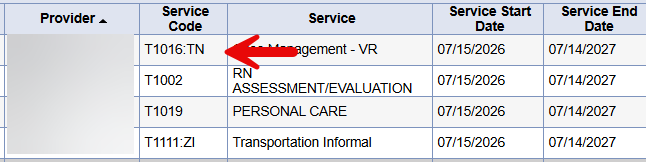
- Select the T1016 line that needs additional units added
- Update the SPA Review Status = Additional CM Units Request (Provider Use Only)

- In the New Text box type in a comment to indicate the number of additional units being requested
Select “Append Text to Note”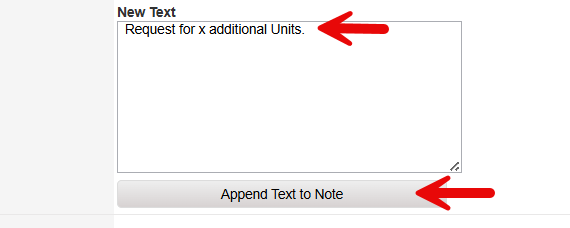
- Hover over “File” on the Menu bar
Select “Save and Close Planned Services”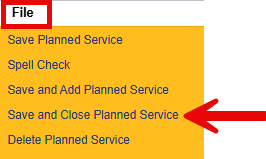
- Hover over “File” on the Menu bar
Select “Close Planned Services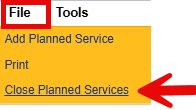
Misc. Information:
- The Medicaid Services Unit (MSU) will be notified on a report that the planned service was updated to “Additional CM Units Request (Provider Use Only)”.
- The Plan Status should not be updated, only the Planned Service as shown above.
- A new T1016 line should not be added when there is already an existing authorized service line for your agency.
- Please give at least 30 days for the request to be processed.
- The Provider should monitor the “Authorizations New/Changed” report to see when the authorization is updated with the additional units.