| Provider Type(s) for Which These Instructions Apply | Program(s) for Which These Instructions Apply |
|---|---|
| All Provider Applicants | All Programs |
The steps in this document will help guide the Provider Applicant in completion of the application process to become a contracted ADvantage, Medically Fragile and/or State Plan Personal Care Services Provider. These steps are to be followed after attendance of the New Provider Orientation (NPO).
New Provider Application Process (Part 2)
Final Certification Activities – OHCA Provider Application (Medicaid Contract)
- Non-Harmony Step: Following attendance of the mandatory New Provider Orientation, the provider should access the OHCA Website to complete the contract application.
- Access the OHCA website at Electronic Provider Application (ohcaprovider.com)
Note: A separate contract is required for each service type.- Click on “New Contracts”
- Choose Additional Waiver Programs.
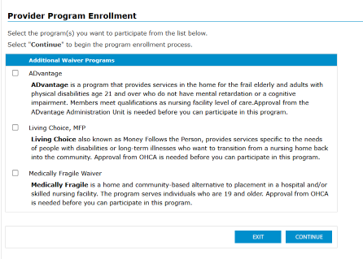
*Note: Assisted Living and Adult Day Health Providers will not select Medically Fragile Waiver.
** Provider Relations will supply the applicant provider with the ADvantage Approval Letter (which will cover ADvantage, Medically Fragile Waiver (MFW), and Living Choice (LC)).- Home Care Providers Only – Complete separate contracts for Personal Care and Skilled Nursing (Required).
Note: Respite and Therapy contracts are optional.
Note: Home Care Services (Personal Care, Nursing, Respite, Therapy) must all have the same +4 zip code on their service location address as this will be used for claims.
- Home Care Providers Only – Complete separate contracts for Personal Care and Skilled Nursing (Required).
- Complete the contract(s).
- For questions specific to the OHCA contract:
- 1-800-522-0114, option 5 for Provider Contracts or email providerenrollment@okhca.org
- Note: To check the status of your SoonerCare application use your application tracking number (ATN) on the link provided: Track ATN Status (ohcaprovider.com).
OHCA will send you an approval letter with your Medicaid number, effective and end dates once your contract is approved. Proceed with step 3 when the letter is received.
- Log into Harmony to upload the OHCA Approval Letter (Printout with OHCA Provider ID)
*The OHCA Approval Letter should be saved to your computer prior to proceeding.
URL to access Harmony: https://ltssbh1.mediware.com/okdhslivenonsso
Note: User should be in the Applicant Provider role. - Select the Providers Chapter

- If your provider record does not automatically open:
Select the Provider Record you want to work on.
- Select the Notes Tab

- Hover over “File” on the Menu bar
Select “Add Notes”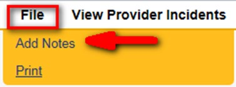
- Select Note Type = “Contracts – Post Certification Attachments”
Select Note Sub-Type = Printout with OHCA Provider ID
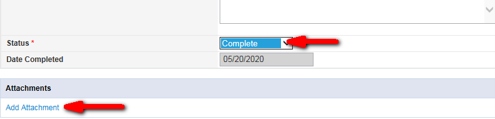
Update Status = “Complete”
Click on “Add Attachment”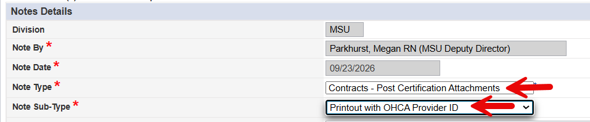
- Browse your computer
Select the OHCA Approval Letter that was saved to your computer
Click “Upload”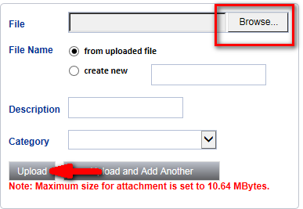
Note: File names cannot be saved using a special character such as “,” or “-”. - Hover over “File” on the Menu bar
Select “Save and Close Notes”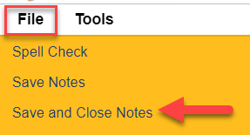
- If applying to provide Case Management (CM) services proceed with the next step, otherwise skip to step 13.
Case Management Agencies Only – Submission of CM Request
- Non-Harmony Step: Case Management Providers need to sign the “Harmony Provider Data Sharing Agreement” early to ensure Case Managers are allowed Harmony access.
- The Provider applicant will submit completed individual Harmony Access Request for agency users via Harmony PQ or fax AND email a signed Harmony Provider Data Sharing Agreement to MSUProviderRelations@okdhs.org.
Note: The MSU Informatics Team will contact the agency to provide the Harmony login information and temporary passwords. Harmony specific training will be scheduled after the certification process is complete.
Note: CM agencies are receiving access at this point in the process to allow for CM Orientation. If the agency is not certified at the end of the process all Harmony access will be immediately terminated.
The next step will guide in submission of a Provider Question (PQ) to request approval for CM Training and CM Positions. To register candidates, see the job sheet “Register Candidate(s) for Case Management Orientation Training” Click Here. A minimum of 3 CMs will need to attend CM Orientation.
Note: Continue to monitor the My Work Chapter in Harmony for any PQ Tickets returned with a status of “Provider Response Needed”. Those tickets should be opened, and a response added to the Note and set back to a status of “Resubmission”.
Each Case Management provider is required to staff four positions. The required positions are: Case Manager, Case Management Supervisor, Back-up Case Management Supervisor and Continuous Quality Improvement Manager (can be held by the Case Management Supervisor). Case Management Providers are required to have a minimum of three staff to cover the required four positions.
Requirements for the four positions from the ADvantage Service Standards:
ADvantage Case Manager (required)
The minimum qualifications for Case Managers are:
- Registered Nurse (RN) with one year paid professional experience; or
- Licensed Practical Nurse (LPN) with one year paid professional experience; or
- Baccalaureate degree and one year paid professional experience with aging or disabled population obtained before or after receipt of degree. Paid professional experience may include, but is not limited to: Certified Nursing Assistant, Certified Medical Assistant, Certified Home Health Aide, or Personal Care Assistant (PCA) experience; and
- A minimum of one week of orientation to the agency’s policies and procedures.
ADvantage Case Management Supervisor (required)
The case management supervisor must meet all of the requirements of the ADvantage case manager and be an experienced manager of people who has direct case management experience with home-based health care or case management services for in home long-term care populations.
ADvantage Back-up Case Management Supervisor (required)
The Back-up Case Management Supervisor must meet all of the requirements of the Case Management Supervisor.
Continuous Quality Improvement Manager (required)
Request will be submitted after successful completion of Case Management Orientation Training.
All Agencies Completion of Provider Post Certification Attachments
Note: Post certification documents require the Authorized Signature Person to sign using either a handwritten ink signature or a valid, verifiable electronic signature. Typed names or pasted signature images will not be accepted.
- Select the Providers Chapter to return to your Provider Record and complete the remaining steps

- Select the Documents Tab

- Select the record in draft status for Provider Certification Application Attachments
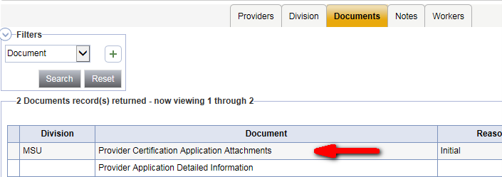
- Take note of the documents listed in the Post-Certification Attachments section.


Note: The link to obtain these documents can be found at the top of the Provider Certification Application Attachment Document.
Note: Leave the status of the document in draft until all documents are uploaded and dates are entered. - Hover over “File” on the Menu bar
Select “Save and Close Documents”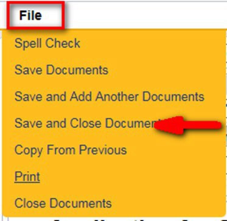
- Select the Notes Tab

- Hover over “File” on the Menu bar
Select “Add Notes”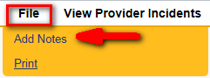
- Select the Document Type = “Contracts – Post-Certification Attachments”
Select the Document Sub-Type of the first attachment you want to upload.
Update Status = “Complete”
Click on “Add Attachment”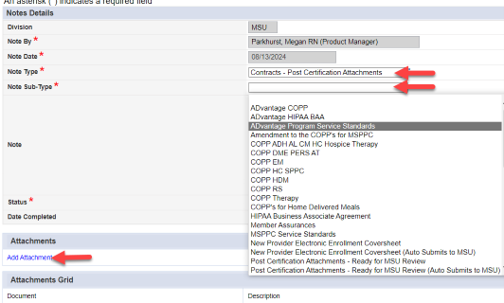
Note: Only the documents listed on the “Post-Certification Attachments” document for your provider type are required. Some Provider Applicants will not use all of the Sub-Type options. - Browse your local computer drive
Select the corresponding scanned document for the note sub-type selected
Click “Upload”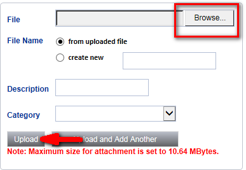
- Hover over “File” on the Menu bar
Select “Save and Close Notes”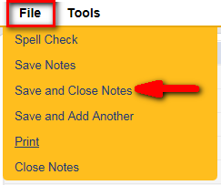
Note: Repeat steps 19 to 22 for all required Post-Certification Attachments using the correct Note Sub-Type for each attachment. - Select the Documents Tab

- Select the record in draft status for Provider Certification Application Attachments
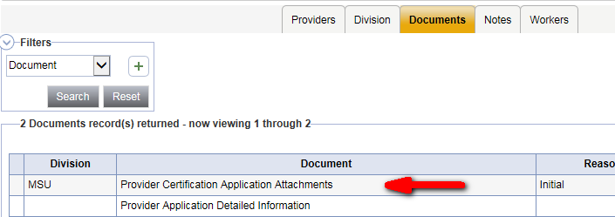
- Enter the date each of the “Post-Certification Attachments” were uploaded to the system and attached to a note on the Notes Tab

- Hover over “File” on the Menu bar
Select “Save and Close Documents”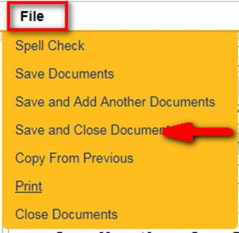
- If applying to be a CM, HC, AL, or ADH provider, follow the Job Sheet titled “Request to Add/Update Continuous Quality Improvement (CQI) Manager” to submit the request for approval of the required CQI designation. Click Here
Note: After this is submitted the process will stop here until the Provider Chapter in Harmony is certified and CQI is approved
MSU Provider Relations will notify the Provider via email when the certification within Harmony is complete.
Provider Relations will schedule MSU and EVV onboarding sessions with the Provider.