| ■ 1) Case Manager |
- Case Manager identifies that the Member is in NEED of an Environmental Modification that will resolve a Health, Welfare, and Safety Issue.
AND
- Other community resources available cannot resolve the Member’s Environmental Modification need.
Waiver Requirements for EM
Environmental Accessibility Modifications are physical adaptations to the home, required by the individual’s plan of care, which are necessary to ensure the health, welfare, and safety of the individual, or which enable the individual to function with greater independence in the home, and without which, the individual would require institutionalization.
ADvantage: Adaptations include the installation of ramps, handrails, widening of doorways, modification of bathroom facilities, and installation of specialized electric and plumbing systems which are necessary to accommodate the medical equipment and supplies necessary for the welfare of the individual.
ADvantage: Excluded are those adaptations or improvements to the home which are of general utility and are not of direct medical or remedial benefit to the individual, and which include construction, reconstruction, or remodeling of any existing construction in the home (floors, sub-floors, foundation work, roof, or major plumbing). Services not covered under architectural modifications include:
- Installation of heating or air conditioning units
- Humidifiers
- Water softener units
- Fences
- Sun rooms
- Porches or decks
- Canopies
- Covered walkways
- Driveways
- Sewer lateral lines or septic tanks
- Foundation work
- Room additions
- Carports
- Non-adapted home appliances
- Carpet or floor covering that is not part of an approved architectural modification that requires and includes a portion of the floor to be re-covered, such as a roll in shower or door widening
- A sidewalk is not authorized unless needed by the member to move between the house and vehicle
- Adaptations which add to the total square footage of the home are excluded from this benefit
Medically Fragile Waiver: Adaptations may include the installation of ramps, lifts, grab-bars, widening of doorways, modification of bathroom or kitchen facilities, or installation of specialized electric and plumbing systems which are necessary to accommodate the medical equipment and supplies which are necessary for the welfare of the individual. Specialized safety adaptations include scald protection devices, stove guards, installation of specialized equipment used by people who have vision or hearing impairments or behavioral challenges.
Medically Fragile Waiver: Excluded are those adaptations or improvements to the home which are of general utility, and are not of direct medical or remedial benefit to the individual, such as carpeting, roof repair, central air conditioning, etc. Adaptations which add to the total square footage of the home are excluded from this benefit. Modifications will not be made to homes owned or leased by waiver service providers. The service is authorized by the members service plan and is necessary to prevent institutionalization.
All services shall be provided in accordance with applicable State or local building codes and conforms to ADA Accessibility Guidelines – 28 CFR Part 36 Appendix A.
*ADvantage Only: Grab Bars are processed under the Request for Installed DME using code S5165:TF
|
| ■ 2) Case Manager |
- “ADv/MFW – Permission to Modify Property” document should be signed by the appropriate owner of the home/land.
*If the home and land are owned by 2 different individuals AND the modification will impact both the home and the land, then an “ADv/MFW – Permission to Modify Property” document is required from both owners.
**If the Member is the home and/or landowner they are still required to sign as appropriate.
– If the document is signed with a wet signature instead of an electronic signature it should be uploaded using Note Type = Environmental Modification and Note Sub-Type = EM Permission to Modify Property
- If Member rents the home and/or land a copy of the current lease must be uploaded to a note in Harmony.
– Note Type = Environmental Modification, Note Sub-Type = EM Home/Land Lease
- If Member lives with a family member a tenancy agreement must be obtained and uploaded to a note in Harmony.
– Note Type = Environmental Modification, Note Sub-Type = Tenancy Agreement
A Tenancy Agreement is an informal document in place of a formal lease. A formal lease or an informal Tenancy Agreement is required when the Member does not own the home to which the Environmental Modification is requested. A Tenancy agreement can be used when a Member lives in a family-owned home or on family-owned property. The Tenancy Agreement must not conflict with tenant protections outlined in the Oklahoma Landlord and Tenant Act.
*Tenancy Agreement is not a Harmony Document and would be a document created between the parties involved.
Note: A valid Tenancy Agreement must include:
- The names and signatures of all parties involved
- The property address and identification of the owner
- The duration of the agreement and/or conditions under which the Member may remain in the home
- A statement of whether the Member contributes financially to the household, including which expenses are covered (rent, utilities, room and board, etc.)
|
| ■ 3) Case Manager |
- T1002 for 10 units is added to the current Plan.
*If the Plan ends in the next 30 days the request should be made on the future plan.
**In Comments of the Planned Service line indicate the request is for Level of Function and for the Verification of Service Delivery (if request is approved).
|
| ■ 4) Case Manager |
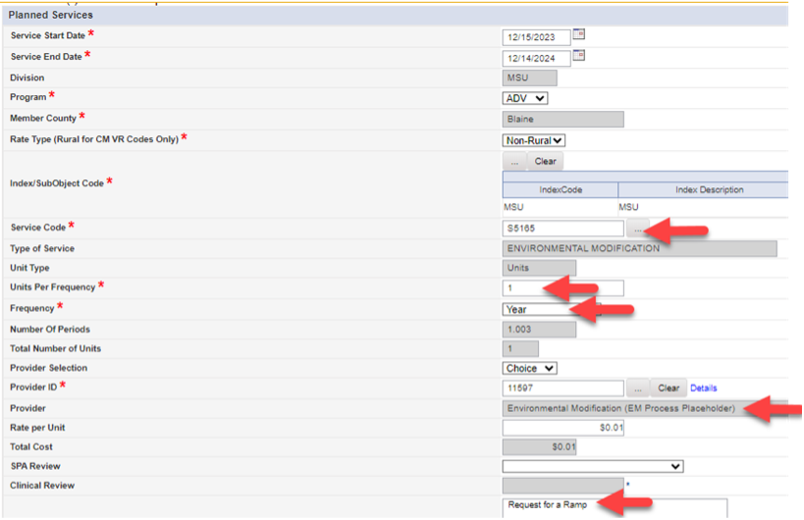
- S5165 or S5165:U1 is added to the plan that was used to add the T1002 service
– S5165 will always be used for a ramp request
– S5165:U1 will always be used for any other type of EM request
*If there are multiple things other than a ramp being requested, all items will be bulked together and requested under S5165:U1
**Two different providers may be used if needed. (1 for ramp, and 1 for other items)
- Units per Frequency = 1
- Frequency = Yearly
- Provider = Select the provider listed as “Environmental Modification (EM Process Placeholder)”
- Comments list details of item(s) that will be requested
|
| ■ 5) Case Manager |
- Submit Plan to Supervisor Review
|
| ♦ 6) Case Management Supervisor |
- Review Request
- If in agreement AND all requirements listed in the previous steps are in place, the Plan is updated to:
– “SPA Review” for submission to MSU on ADvantage Cases
– “MFW SPA Review” for submission to MSU on Medically Fragile Waiver Cases
|
| ● 7) MSU Service Plan Authorization (SPA) Team
*MFW Team will review requests on MFW Members.
|
- Reviews case for Permission to Modify document to ensure it is present and signed as appropriate
- If Permission to Modify document indicates the Member rents, SPA reviews for a copy of the lease
- If appropriate documentation is present, T1002 is authorized (SPA line = Authorized, Clinical Line = CR NOT Needed)
- If there is already an authorized T1002 line on the Plan, then the units will be added to the original authorization and the additional request will be withdrawn
– A Comment will also be added to the original authorization to indicate that the 10 units are added for the Level of Function and for the Verification of Service Delivery (if request is approved).
*SPA Team, please note that there will not be an Identified Need corresponding to this request.
|
| ● 8) MSU Service Plan Authorization (SPA) Team
*MFW Team will review requests on MFW Members
|
- The generic “Environmental Modification (EM Process Placeholder)” planned service line will be updated to a status of “EM – Ready for Level of Care Function” on the Clinical Review line.
- The SPA Review line will be updated to reflect “SPA Review NOT Needed”
*This generic Planned Service line will be used to capture the status of where the request is in the process and will later be updated to reflect the actual Provider if approved.

|
| ● 9) MSU Service Plan Authorization (SPA) Team
*MFW Team will review requests on MFW Members
|
- Plan status is updated to Open, CM Action Needed, or any other appropriate status depending on other review needs of the plan.
|
| ● 10) MSU Service Plan Authorization (SPA) Team
*MFW Team will review requests on MFW Members
|
- A Plan Note will be sent to the CM and CMS to serve as notification of the approval to proceed with having the Home Care agency complete the RN visit
– Note Type = Environmental Modification, Note Sub-Type = Approval to Proceed with EM Process
|
| ■ 11) Case Manager |
- Request Home Care Provider to have the RN complete the “ADv/MFW – EM Level of Function/Need Assessment” document in Harmony
|
| 🟊 12) Home Care RN |
- “ADv/MFW – EM Level of Function/Need Assessment” is completed in Harmony
- Pictures of the area to be modified MUST be taken and attached to a note in Harmony (No pictures of Members should be taken)
– Note Type = Environmental Modification, Note Sub-Type = EM Request Pictures
- If a Ramp is requested, pictures of all exits to the home must be included in addition to the one where the ramp is being requested.
- If bathroom modification is requested, pictures of all bathrooms in the home must be included in addition to the one where the modification is being requested.
- Notification sent to the CM that the assessment is completed and available in Harmony along with required pictures.
*The process will be denied without appropriate picture documentation.
|
| ■ 13) Case Manager |
- Planned Service Clinical Review status for the generic “Environmental Modification (EM Process Placeholder)” is updated to EM – Level of Function Complete
- Reminder: The Service Plan will NOT be submitted for SPA Review
|
| ➤ 14) MSU EM Modification Review Team Lead
*MFW Team will take actions for MFW Members
|
- Status of “EM – Level of Function Complete” is identified on the Report used by the Review Team to monitor request
- Request is reviewed for all required items listed in the steps above
– If any requirement is missing, the EM request is Not Authorized, and the Plan is set to a status of CM Action Needed
– If all requirements are present the generic “Environmental Modification (EM Process Placeholder)” planned service line will be updated to a status of “EM – Ready for Committee Review”
|
| ➤ 15) MSU EM Modification Review Team |
- EM Committee Review Meeting is held to review any request in a status of “EM – Ready for Committee Review”
|
| ➤ 16) MSU EM Modification Review Team Lead
*MFW Team will take actions for MFW Members
|
- Decision to Not Authorize the EM Request:
– The generic “Environmental Modification (EM Process Placeholder)” planned service line will be updated to a status of “Not Authorized” with the appropriate reason listed
- Decision to Proceed with EM Request:
– The generic “Environmental Modification (EM Process Placeholder)” planned service line will be updated to a status of “EM – Ready for BID’s”
|
| ➤ 17) MSU EM Modification Review Team Lead
*MFW Team will take actions for MFW Members
|
- Plan Note will be sent to CM and CMS to notify of outcome of the EM Review Committee decision
– Note Type = Environmental Modification, Note Sub-Type = Outcome of EM Review Committee Decision
|
| ■ 18) Case Manager |
If decision was to Proceed with EM Request, CM will proceed with following steps:
- BID’s from 3 EM Providers in the Members county are obtained
- *If the first BID is under $2500 then 2 more BID’s are not required
- **DO NOT add the EM Provider to the Provider Enrollments Tab at this point of the process.
- ***The EM Provider does not have access to the Harmony record at this point, so the CM will need to email the pictures to the EM Provider AND upload copies of the BID’s received from the EM Provider to the Harmony record.
- ****The same provider does not have to BID on both the Ramp and other items
- *****The Certified Agency Report (CAR) will indicate “Ramps” if they only provide Ramp Services or “Ramps+” if they do both Ramp and other services.

|
| † 19) EM Provider |
- If in agreement to BID on a project, detailed BID with schematic drawings are submitted to the CM for submission in Harmony
- If unable to bid on project, EM Provider must submit refusal to bid to CM within 10 business days of CM request
*The BID or refusal to BID should be submitted to the Case Manager (CM) on a document that is printed on the letterhead of the Environmental Modification Provider.
|
| ■ 20) Case Manager |
- Update the Identified Needs to reflect the EM Service on the Plan of Care
- The generic “Environmental Modification (EM Process Placeholder)” planned service line will be updated to a status of “EM – BID Ready for Review”
- Reminder: The Service Plan will NOT be submitted for SPA Review
|
| ➤ 21) MSU EM Modification Review Team Lead
*MFW Team will take actions for MFW Members
|
- Status of “EM – BID Ready for Review” is identified on the Report used by the Review Team to monitor request
- If Request is for under $2500, proceed with step 22
- If Request is for $2500 or greater, skip to step 23
|
| ➤ 22) MSU EM Modification Review Team Lead
*MFW Team will take actions for MFW Members
|
Request is for under $2500
- Plan is reviewed to ensure identified needs have been added as appropriate
- EM Planned Service line is updated to reflect the actual EM provider that will be providing the service
- Planned service line will be updated to a status of “EM – Approved for Build”
- Plan Note is sent to CM and CMS to notify of Approval for Build
– Note Type = Environmental Modification, Note Sub-Type = EM Approval for Build
CM/CMS receives the Approval for Build Note and skips to step 26
|
| ➤ 23) MSU EM Modification Review Team Lead
*MFW Team will take actions for MFW Members
|
Request is for $2500 or over
- Plan is reviewed to ensure 3 BID’s and/or any additional documentation is present as appropriate
- Planned Service line will be updated to a status of “EM – Ready for Committee BID Review”
|
| ➤ 24) MSU EM Modification Review Team |
- EM Committee Review Meeting held to review all request in a status of “EM – Ready for Committee BID Review”
|
| ➤ 25) MSU EM Modification Review Team
*MFW Team will take actions for MFW Members
|
Decision to Not Authorize the EM Request:
- The generic “Environmental Modification (EM Process Placeholder)” planned service line will be updated to a status of “Not Authorized” with the appropriate reason listed
Decision to Proceed with EM Request:
- EM Planned Service line is updated to reflect the actual EM provider that will be providing the service
- *The lowest BID that can complete the work will be selected.
- Planned service Clinical Review line will be updated to a status of “EM – Approved for Build”
- Plan Note is sent to CM and CMS to notify of Approval for Build
– Note Type = Environmental Modification, Note Sub-Type = EM Approval for Build
CM/CMS receives the Approval for Build Note and proceeds to step 26
|
| ■ 26) Case Manager |
- Shares copy of approved BID with schematic drawing with the home/landowner
– If home/landowner has any concerns related to the schematic that should be addressed with the EM provider prior to work starting. Any changes to the schematic must be resubmitted for approval by the EM Review Committee.
- EM Provider is added to Provider Enrollments Tab of Member Record
- Notify EM Provider that they are approved to proceed with the EM Build
*Notification should also be made to EM Providers not selected to make them aware of outcome of BID.
|
| † 27) EM Provider |
- Completes work as outlined in the approved BID, with no deviation from the approved schematic.
- Notifies the CM when the work is complete
*If it is identified that any deviation from the original approved schematic is needed, discussion with the CM should occur and the CM should notify MSU via PQ for additional guidance before any work outside of the approved schematic is completed.
|
| ■ 28) Case Manager |
- EM Planned Service Clinical Review line is updated to status of “EM – Ready for Verification of Service Delivery”
- Request made to Home Care Agency to have RN complete the ADv/MFW – EM Verification of Service Delivery” document
|
| 🟊 29) Home Care RN |
- “ADv/MFW – EM Verification of Service Delivery” document is completed in Harmony with appropriate signatures obtained
– If wet signature, not electronic signature, is obtained use Note Type = Environmental Modification, Note Sub-Type = EM Verification of Service Delivery
- Pictures of the completed EM work are taken and uploaded to a Note in Harmony
– Note Type = Environmental Modification, Note Sub-Type = EM Project Completion Pictures
- Notification sent to the CM that the assessment is completed and available in Harmony along with required pictures.
*If a Member received more than one environmental modification AND the work was completed by more than one Provider, then an “ADv/MFW – EM Verification of Service Delivery” form must be completed for each Provider involved.
|
| ■ 30) Case Manager |
- Planned service Clinical Review line will be updated to a status of “EM – Verification of Service Delivery Complete”
- Reminder: The Service Plan will NOT be submitted for SPA Review
|
| ➤ 31) MSU EM Modification Review Team
*MFW Team will take actions for MFW Members
|
- Status of “EM – Verification of Service Delivery Complete” is identified on the Report used by the Review Team to monitor request
- Plan is reviewed to verify that all required documentation is present and that the pictures of the completed project match what was intended and previously approved by the Review Committee
|
| ➤ 32) MSU EM Modification Review Team
*MFW Team will take actions for MFW Members
|
- Planned service line will be updated to a status of “Authorized”
- Authorization is created
*The PA generates when the file goes to OHCA the evening the authorization is created.
- Plan Note is sent to CM, CMS, and EM Provider to notify of Authorization
– Note Type = Environmental Modification, Note Sub-Type = EM Authorized
|
| † 33) EM Provider |
- Claim may be submitted the day after notification is received that the Authorization was complete.
|