| Provider Type(s) for Which These Instructions Apply | Program(s) for Which These Instructions Apply |
|---|---|
| All Providers | All Programs |
ADvantage, Medically Fragile and Living Choice this process will be used by both the Case Manager and other Non-Case Manager users anytime a Member record needs to be closed.
SPPC this process will be used by the Home Care Provider.
*Click on your role to navigate to the appropriate instruction section.
Case Manager (ADvantage, Medically Fragile, Living Choice) OR Home Care Provider (SPPC) Actions
- Open the Member Record.
- Select the Provider Enrollments Tab

- Hover over “Reports” on the Menu bar.
Select “Case Processor by Provider.”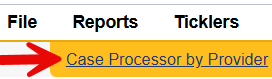
- Navigate to the Notes Tab in the Member Record

- Add a Note
- Note Type = Service Termination (auto submits to MSU), Note Sub-Type = use the appropriate reason for the closure.
- Note Status = Alert
- Use the appropriate “Program” to ensure notification is sent to the correct MSU team.
- Add all Case Processors listed on the “Case Processor by Provider” report as a Note Recipient

- Living Choice and Medically Fragile Waiver cases – The OKDHS or OHCA Team Member should be added as a Note Recipient.
- ADvantage and SPPC cases – The OKDHS Team Member should not be added as a Note Recipient.
Supporting information that must be included with closure request:
| Closure Request Reason | Supporting Information that must be included |
|---|---|
| Nursing Facility | Date of ICF/LTC admission and the name of the Nursing Facility. Note: Cases are not closed when the Member is admitted for SNF (Skilled Nursing) services. When the Member is admitted for ICF/LTC services, the waiver case is not closed until the Nursing Facility application and orders are received from the Nursing Facility, so the admission date can be validated. |
| Death | Date of Death Note: Confirm DOD with family and/or online obit. |
| Unable to Locate | A certified letter must be sent to the Member and a copy of the letter along with proof of return receipt must be attached to the closure request note. Note: See information following this table regarding return receipts. *In addition to the requirement to send a certified letter, the Case Manager should wait until the Member has been without services for 90 days before submitting a closure request to MSU based on the Member being unable to be located. |
| Withdrawal | Voluntary Withdrawal Request that is signed by the Member or legal representative. |
| Moved out of state | Date Member moved or is planning to move and forwarding address if known. |
| Incarceration | Date of incarceration and name of facility. |
| Refusal of PCA Services >90 days (SPPC ONLY) | *Per policy [OAC 317: 35-15-10(h)(1)(H)] SPPC services may be discontinued when: the Member refuses to select or accept a Provider or Personal Care Assistant (PCA) service for 90 consecutive days as professional or credible documentation supports. |
Return Receipt provides the sender with proof of delivery (the recipient’s signature along with information about the delivery address, if different, and date of and time of delivery).
- A Return Receipt may be purchased at the time of mailing. A mailer can no longer purchase a Return Receipt After Mailing but can request information from the delivery record if the previously purchased Return Receipt did not arrive.
- A mailer purchasing return receipt service may choose to receive the Return Receipt by mail (by use of PS Form 3811 often called the Green Card) or email (by electronic Return Receipt).
- Proof of delivery includes the following information:
- Date of Delivery.
- Signature of Recipient (or Recipient’s Authorized Signature Person).
- Information about the recipient’s actual delivery address, if different.
- If provided by email, the Return Receipt includes a link to the USPS Tracking® prepopulated with tracking/delivery information on the mail item.
Note: Once a case has been closed by MSU and a “Service Termination (MSU Only)” note has been added, Providers must not:
- Change the status on the Division tab
- Add any Providers back to the Provider Enrollments tab
If reactivation is needed, a new online application must be submitted. If the application is approved, MSU will issue a note confirming the reactivation.
Non-Case Manager Actions
- If notified of a closure via a note from the Case Manager, the user must ensure that services are closed in accordance with their agency’s internal procedures. A Note with Note Type = “Service Termination (MSU Only)” will be sent once final closure action is taken by MSU. Services should be provided as appropriate through the closure effective date of this notice.
OR
If the user is the first to identify the need for case closure, the following steps should be taken: - Navigate to the Division Tab

- Review the record for the assigned Case Manager

- Navigate to the Notes Tab

- Add a Note
- Note Type = Notification, Note Sub-Type = Request for Service Termination
- Make sure the Case Manager identified on the Division Tab is added as a Note Recipient
- Note Status = Alert