| Provider Type(s) for Which These Instructions Apply | Program(s) for Which These Instructions Apply |
|---|---|
| Home Care LPN’s | All Programs |
This process will be followed whenever an LPN completes a nursing assessment to notify the RN that the assessment documentation has been completed.
- LPN completes the current version of the “Nurse Evaluation” on the Documents Tab of the Member Record.

- After the Nurse Evaluation documentation is completed, the LPN will navigate to the Notes Tab of the Member Record.

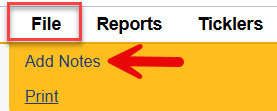
- Hover over “File”
Select “Add Notes”
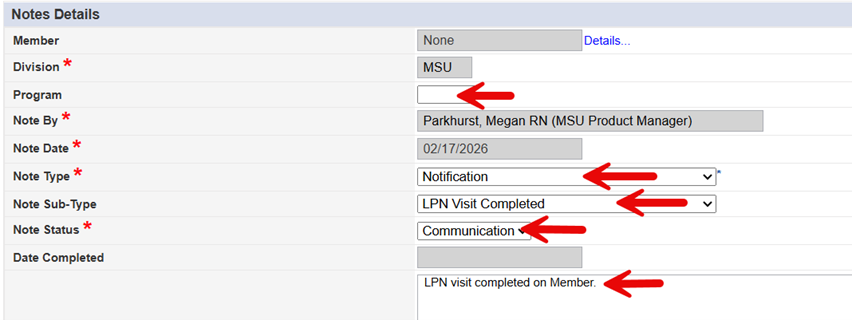
- Select the appropriate program
Select Note Type = Notification
Select Note Sub-Type = LPN Visit Completed
Select Note Status = Communication
Add any relevant findings or observations from the nurse evaluation that the RN should be made aware of in the Note field.
- Scroll down to the “Note Recipients” section
Click on the “Lookup” button

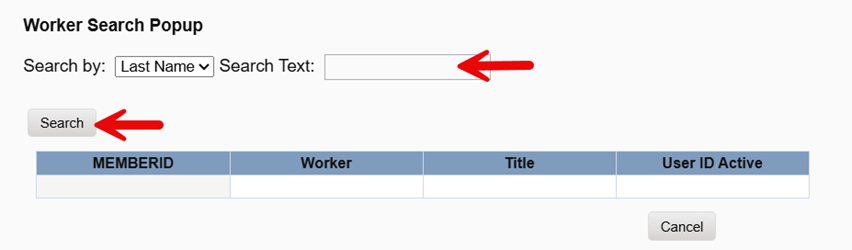
- Type in the first 3 letters of the RN’s last name that needs to be made aware of the completed LPN visit.
Select “Search”
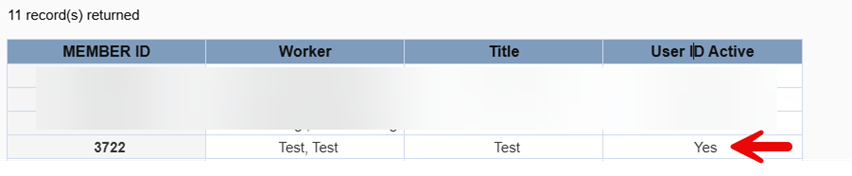
- Select the appropriate worker from the list
*Make sure the “User ID Active” column indicates “Yes”
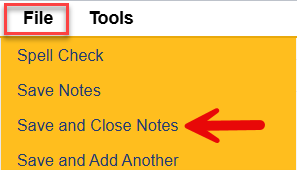
- Hover over “File”
Select “Save and Close Notes”
The RN will receive the notification regarding the visit on their My Harmony Chapter/Members Column/Notes Pane under “Communication”.