| Provider Type(s) for Which These Instructions Apply | Program(s) for Which These Instructions Apply |
|---|---|
| All Providers | ADvantage and SPPC |
If an individual is identified as having a “Companion Plan,” this status must be reflected on the Demographics tab of the member record by following the steps below.
Cases considered a “Companion Plan” include:
- Two or more ADvantage members residing in the same home
- Two or more SPPC members residing in the same home
- Any combination of ADvantage and SPPC members residing in the same home
Note: Members identified as receiving Medically Fragile or Living Choice services are not required to be marked as a Companion Plan.
While it is encouraged for Members to use the same providers, it is not required. For new cases, if the individual does not indicate a provider preference, they will be assigned to the same providers already delivering services in the home.
Two or more ADvantage members residing in the same home
Two or more SPPC members residing in the same home
- Open the Member Record
- Select the Demographics Tab

- Hover over “Edit” on the Menu bar
Select “Edit Demographics”
- Check the box for “Companion Plan”
Enter the Medicaid ID number of the companion
- Hover over “File”
Select “Save and Close Demographics”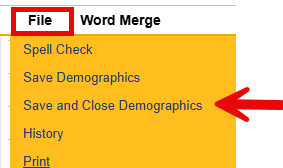
Note: If the Members’ living arrangements change, the Companion Plan designation must be updated. Follow the same steps to uncheck the Companion Plan box on the Edit screen.