| Provider Type(s) for Which These Instructions Apply | Program(s) for Which These Instructions Apply |
|---|---|
| All Providers | NA |
This process will be used as a guide to request to add or update the CQI Manager.
*Note: Requests for approval of a CQI Candidate must:
- Be submitted via Harmony PQ Note by the agency’s authorized signature person;
- Be accompanied by the Candidate’s current resume and copy of college diploma for non-nursing applicants or – if the candidate is an RN or LPN – the license number must be included with the resume. Indicate at a minimum the month and year of start and end dates of employment for each job;
- Include a detailed description of the job duties to be considered.
- Adult Maltreatment Training must be completed and the certification uploaded to the Worker record prior to completing the CQI request. See “Completion of Adult Maltreatment Training” for specific instructions.
The Continuous Quality Improvement Manager Must:
- Be an onsite employee in a managerial position in the agency with authority and responsibility to implement the provider’s CQI Plan as well as for quality assurance activities, staff performance and agency strategic planning; AND
- Have previous administrative and/or supervisory experience; AND
- Meet the following requirements:
- RN with one year paid professional experience; OR
- LPN/OTA/PTA with one year paid professional experience; OR
- Baccalaureate degree and one year paid professional experience with the aging or disabled population obtained before or after receipt of the degree.
- *Paid professional experience may include but is not limited to: CNA CMA, CHHA, and PCA experience; AND
- Be an experienced manager of people with minimum of one (1) year of personnel management, which may include direct involvement with hiring, training, assignment of work, evaluation of work performance, commendation and disciplinary action, and termination of personnel; OR
- For AL/ADH Providers a Nursing Home or LTC Administrators License would be acceptable in lieu of RN/LPN license
- The CQI Manager for a case management Provider must be an actively certified ADvantage Case Manager, carrying a minimum caseload of 3 Members.
- As this position is responsible for the agency’s ADvantage Continuous Quality Improvement Plan, they must attend all CQI ADvantage trainings.
Ensure the following documents are saved to your local machine, as they will be required when submitting a note with your training request.
- Current Resume
and
- Proof of Bachelor’s Degree (Diploma or Conferred Transcript)
or
- RN/LPN License (OBN or NURSYS)
– Report indicating if Candidate has received disciplinary action is required.
or
- Nursing Facility or LTC Administrator License
and
- Photo Identification
Note: documents must be saved with the following format: “First Name Last Name Document Type” Example: John Doe Resume
- Navigate to the PQ Chapter

- Hover over “File”
Select “Add PQ”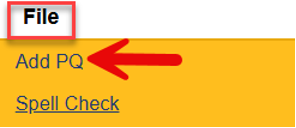
- Complete the blank field(s) of the record
Select Program of “ADvantage”
Click the box with the three dots ( … ) next to “Select User’s Provider Record”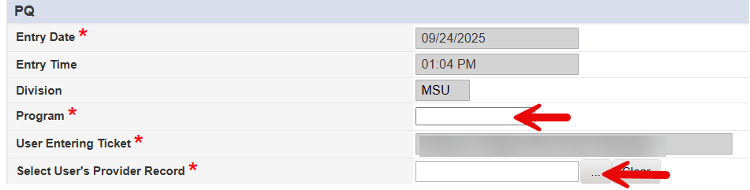
Type in a minimum of the first 3 letters of the Provider you are associated with
Click on “Search”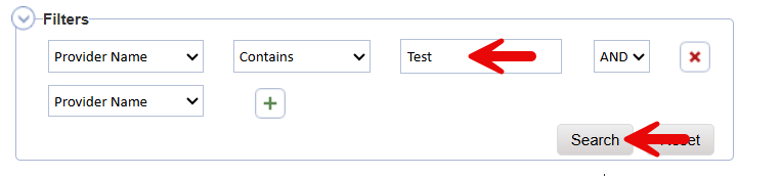
Select the appropriate record from the list
Select the Inquiry Type of “Training”
In the Detailed Information field, Type Consideration for CQI position approval.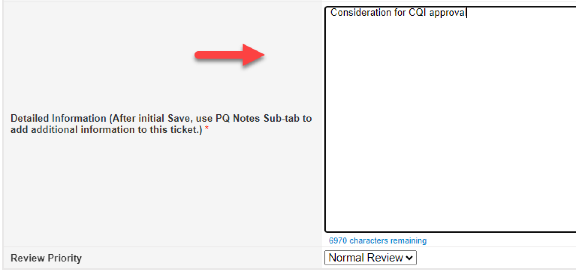
- Hover over “File”
Select “Save PQ”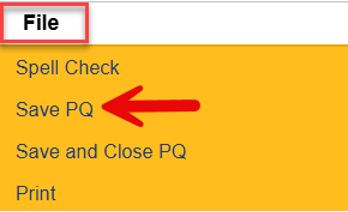
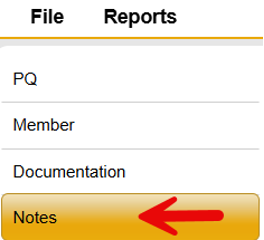
- Select “Notes” Sub-Tab
Hover over “File” from the menu bar
Select “Add Note”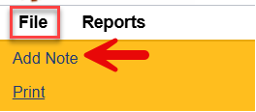
Select the I&I Note Type of “CQI Request”
Update the Status to “Communication”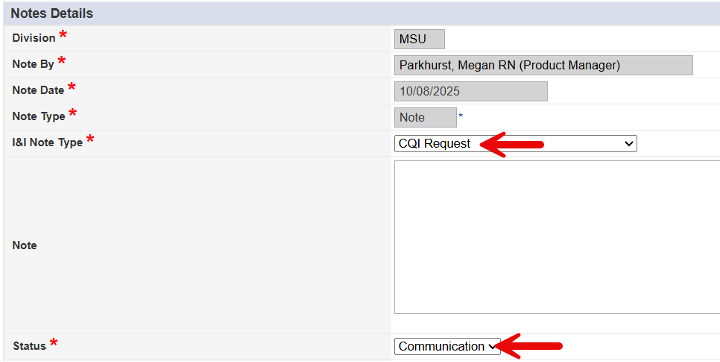
Select “Add Attachment”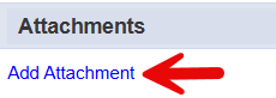
Select “Choose File”
Select document to be attached from your local computer
Reminder, the following documentation is required:
– Current Resume
and
– Proof of Bachelor’s Degree (Diploma or Conferred Transcript)
or
– RN/LPN License (OBN or NURSYS)
– Report indicating if Candidate has received disciplinary action is required.
or
– Nursing Facility or LTC Administrator License
– A detailed description of the job duties to be considered should also be attached to the Note.
and
– Photo Identification
Type in appropriate “Description”
Select appropriate “Category”
Select “Upload”
Return to “Choose File” to add all required documents. - Hover over “File” from the menu bar
Select “Save and Close Note”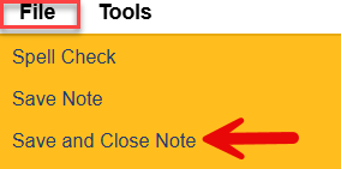
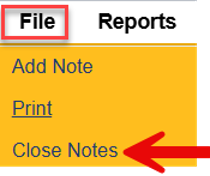
Hover over “File” from the menu bar
Select “Close Notes” to exit the PQ Ticket